
The Sticker Sale is a special in-game event that rewards you with unique stickers for making purchases during active sales. These stickers can be accumulated to unlock milestone rewards and spent in a dedicated Event Store to get massive discounts on exclusive buildings and valuable resource packs.
Glossary
- Feature / Event (limited activity): A special, limited-time activity in the game with its own rules, tasks, and exclusive rewards that are separate from your daily city tasks.
- In-game Sale / Promotion (special offer): A limited-time offer where you can buy items, resources, or buildings, often featuring extra bonuses like Stickers.
- Progress Bar (milestone tracker): The visual line or meter in the event window that fills up as you collect stickers, showing how close you are to your next reward.
- Milestone (reward checkpoint): A specific checkpoint on the progress bar that unlocks a guaranteed prize once your sticker total reaches it.
- Unique Building (exclusive reward): A rare, special building that cannot be bought in the regular game shop, offering better rewards like energy or rare currency.
- Seasonal Currency (temporary tokens): Special temporary tokens (such as autumn leaves, winter snowflakes, or beach pearls) that change depending on the current season and are used to buy themed items.
- Countdown Timer (event clock): The small clock shown on the event icon or window that tells you exactly how much time is left before the event or sale ends.
This is a side feature allowing you to make your in-game purchases more beneficial.
While this feature is on, items you buy on in-game sales earn you different amounts of stickers. You can then spend your stickers for a bigger discount in the event store.
The feature lasts 90 days; the event store will be open for another 3 days after the feature is over.
How to obtain stickers
1. Check out a sale in the game. Each item on sale is assigned a specific number of stickers.

2. When you buy an item marked with a sticker icon, you get the number of stickers specified near this icon. Your earned stickers then appear in the feature window.

3. Accumulating stickers brings you closer to milestones. Each milestone brings you a reward.

4. Once you reach a milestone, don't forget to claim the reward. Click on the green button to claim it.

How to use stickers
You can use stickers in the event store, which has 2 major parts.
The Buildings part includes a new city sight (unique building), a city sight from previous events (unique building), and several ordinary ingame buildings (non-unique buildings).
The Items part includes packs of items for different game locations.
Each offer has several purchase options.
For unique buildings and items: you can use only one of the purchase options for each unique building/item pack. The more stickers you spend for an option, the bigger the discount.
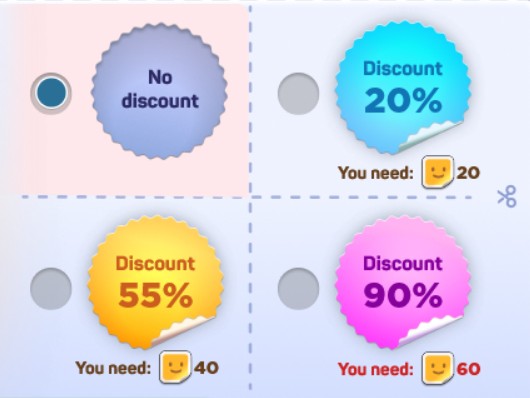
For ordinary buildings: you can purchase the building several times, applying different offers. But each particular offer can be purchased only once. Some of these offers also contain useful items.

Here you can see that the green stickers are the ones that have been earned and spent and the yellow ones are the ones that have been earned and not yet spent:

You can keep track of your stickers in the upper left corner of the feature window. It only shows the number of your active (yellow) stickers. These are the stickers you can spend in the event shop.

