
If you are playing SuperCity through the Microsoft Store, you might occasionally have questions about your in-game purchases. Whether you need to verify a payment, request a refund, or troubleshoot a billing error, this guide has you covered.
How to Find Your Purchase Receipt
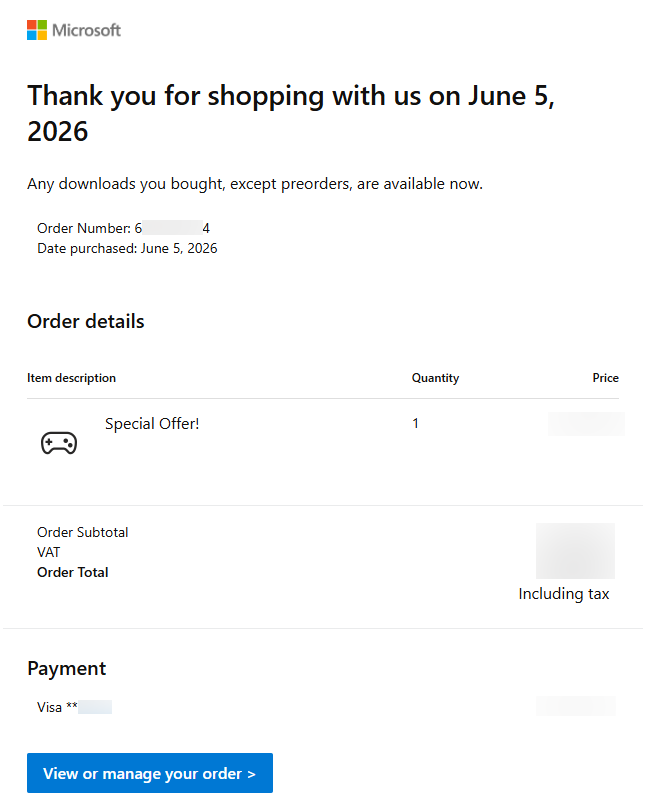
The SuperCity Support Team may ask you to provide a receipt to verify a payment on our end. Here is how you can find and share it:
- Check your inbox: Receipts are automatically sent to the email address that is linked to your Microsoft account. Search your inbox for messages from [email protected].
- Allow for processing time: Receipts might not arrive instantly. A delay of up to 12 hours is completely normal, so don't worry if you don't see it right away.
- Take a screenshot: Once you locate the email, please take a clear screenshot (How to take a screenshot) of the entire receipt to send to our team.
For reference, your screenshot should look similar to the example shown below:
Requesting a Refund
If you need a refund for an in-game purchase, we highly recommend contacting SuperCity Support first. This allows our team to check the transaction details on our side and ensure everything is documented properly.
However, if you wish to request a refund immediately, you can do so directly through Microsoft by following their official guide:
Troubleshooting Payment Processing Issues
Please note that the SuperCity Support Team does not have access to Microsoft's billing systems and cannot resolve payment processing issues. We are unable to assist with:
- Payments not going through or being declined
- Errors when choosing or updating a payment method
- Microsoft account verification problems
If you are experiencing any of these issues, please reach out to Microsoft directly. You can find their official troubleshooting steps here: